# Claiming $DOB
`$DOB` rewards are earned at a continuous steady rate all the way from the moment a DeOrder is placed to its expiry date.
`$DOB` rewards must be claimed manually via the [Claim & Exercise](https://deorderbook-1.gitbook.io/deorderbook-docs/dob-website/claim-and-exercise) page.
### How do I claim my $DOB rewards?
1. Connect your supported wallet to the platform. At the time of writing, DeOrderBook supports Metamask and Wallet Connect.
2. Visit the DeOrderBook website at [www.deorderbook.com](http://www.deorderbook.com) .
3. Navigate to the Claim & Exercise page.
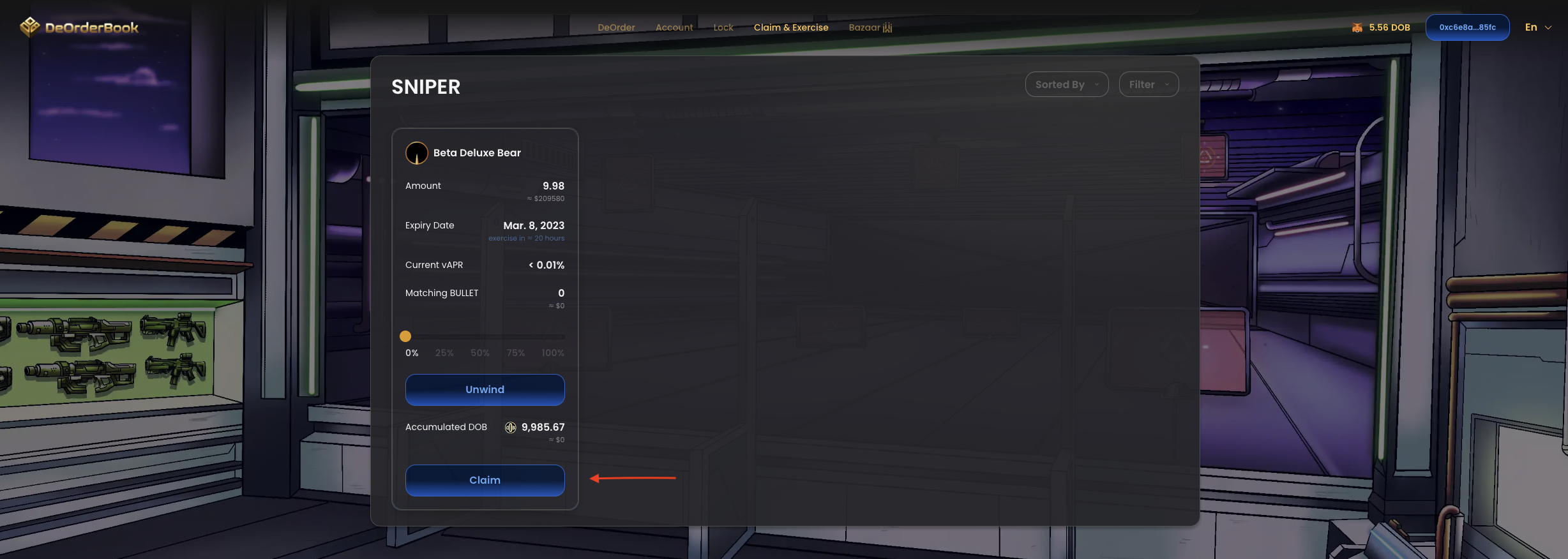
4. Scroll to the SNIPER section of the page. This will show all pools you have entered after placing a DeOrder.
5. Look for the DeOrder pool you'd like to claim from, and click the 'Claim' button.
More SNIPER pools will be displayed based on how many DeOrders placed.
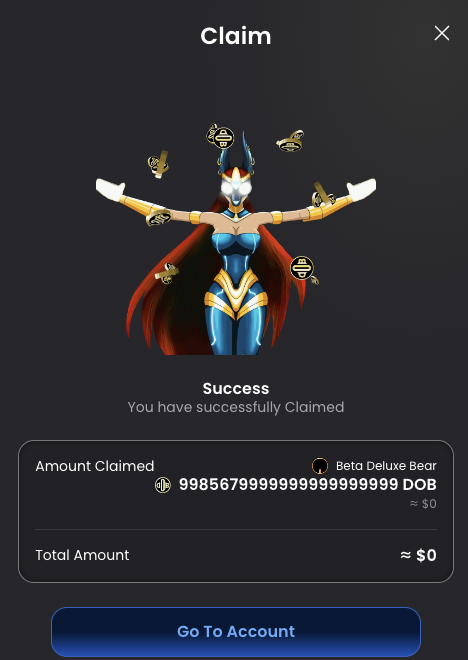
6. After approving the transaction on Metamask and waiting for it to go through, you will see a Success pop-up confirming the transaction success and relevant details.
You've successfully claimed a massive amount of $DOB!
### Tutorial Video 🎥 : Claiming $DOB Tokens
{% embed url="" %}
Learn how to claim $DOB tokens earned from placing DeOrders.
{% endembed %}